Load media
Select a paper size to continue.
To load full-size paper
-
Lower the paper tray, and then pull out the paper tray and tray extender.

-
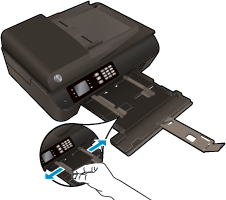
Slide the paper-width guides outward.
-
Load the paper.
-
Insert a stack of paper into the paper tray with the short edge forward and the print side down.

-
Slide the stack of paper forward until it stops.
-
Adjust the paper-width guides so they fit against both sides of the stack of paper.

-
Slide the paper tray in.

-
To load small-size paper
-
Lower the paper tray, and then pull out the paper tray and tray extender.
-
Slide the paper-width guides outward.
-
Load the photo paper.
-
Insert a stack of photo paper into the paper tray with the short edge forward and the print side down.

-
Slide the stack of photo paper forward until it stops.
-
Adjust the paper-width guides so they fit against both sides of the stack of photo paper.
-
Slide the paper tray in.

-
To load envelopes
-
Lower the paper tray, and then pull out the paper tray and tray extender.
-
Slide the paper-width guides outward.
-
Load the envelopes.
-
Insert one or more envelopes in the center of the paper tray. The side to be printed on should face down. The flap should be on the left side and facing up.

-
Slide the stack of envelopes forward until it stops.
-
Adjust the paper-width guides so they fit against both sides of the stack of envelopes.
-
Slide the paper tray in.

-